Showing posts with label Technology. Show all posts

Science Podcast Episode Guide

So as many of you may already know, I made the switch this year to teaching middle school science and I absolutely LOVE it! I don't know why I spent so many years teaching elementary. I won't go on and on about the many reasons WHY, but just take my word for it.

Podcasts have become a big thing in education in the last couple of years. I know personally, I love listening to podcasts on my way to work every morning. True Crime is my favorite genre! My Favorite Murder and Sword and Scale are my two go to podcasts that I listen to on my daily commute.

When I taught third grade, we listened to a podcast called Six Minutes each day when we came in from recess and the students loved that time. You could hear a pin drop....It was a daily story that kept their attention and left them wanting more each day!

As a science teacher now, I've been looking for a way to incorporate podcasts into my science classroom, but just hadn't found the time to really look into all the science podcasts out there and what they have to offer. There are so many wonderful science podcasts with SOOOO many episodes.

I had a thought that I just needed to comb through each podcast and come up with guide broken down by podcast, topic, title, episode, and length so that when I want to use one, I can just go to my guide and pick one. I know this is going to make it less daunting for me to use a podcast in one of my lessons instead of spending hours (which is literally what I did creating this guide) looking for just the right episode to correspond to my lesson.

I created a Google Sheet and added tabs across the bottom for different scientific topics. At the top, I listed the title of the Podcast, the topic that the episode covers, the title of the episode, the episode date, and the length of the episode. You can see in the example below how it is set up.


Science genres included are:

  • Earth and Space
  • Biology
  • Earth (plate tectonics, oceans, atmosphere, volcanoes, earthquakes)
  • Earth's History (fossils, dinosaurs, evolution)
  • Ecology
  • Light and Sound
  • Environment
  • Weather
  • Health
  • Scientific Method
  • Chemistry
  • Physics
  • Geology
  • Genetics

The podcasts that I used are:

  • Science Weekly
  • 60 Second Science
  • Brains On Science
  • Science Friday
  • Tumble
  • Fun Kids Science Weekly
  • But Why
  • Wow in the World
  • The Show About Science
As new episodes are added to each podcast, I plan on updating the list each month. I hope you all find this document helpful for your science classrooms. If you would like to make a copy, please download it HERE. 

For future updates, you will need to come back and make a copy again. If you know of any other great science podcasts for kids, let me know and I will check them out and consider adding them to the guide!


Teacher Binder and Tool Kit

I have been wanting to create something like this for my classroom for a long, LONG time and I finally found the time and the motivation to do it. I tried to think of every single thing I could think of that I would need or use throughout the school year. 

Here is what I included:


There are many other pages that are not included in the preview here! There are 185 pages included in the file!

You can purchase your own set by clicking my blog button below!


I would love to hear if there is anything else you think I am missing that you would like to see included. I could include an add on pack later on if there are enough suggestions. ;)

You can win yourself a copy of this file by commenting below and telling me the city I am currently visiting right now.

Also, if you know me on facebook, you are not allowed to comment below!

Hint: See the picture below! =)


Leveling Your Own Reading Materials

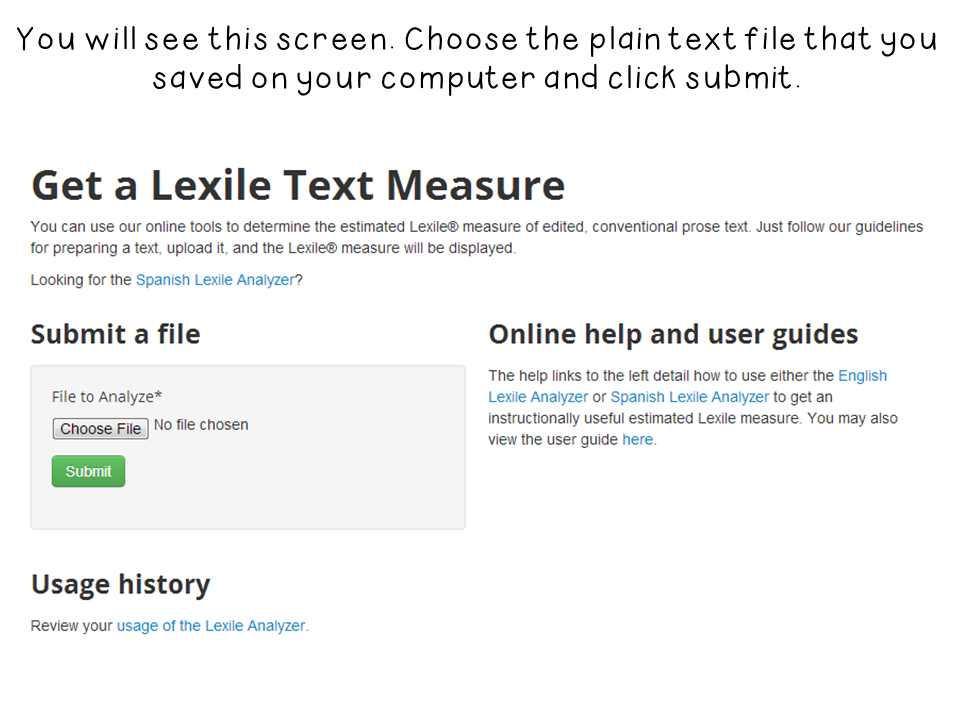
Just this past week, I discovered that you can actually level your own texts. Most Scholastic books these days already come leveled, but what if you have textbok passages or reading passages that you have created and want to know what the level is? The answer is this amazing website! Follow the picture tutorial for using the Lexile Analyzer.


Just click the image below to download a copy of my chart. I used a combination of different resources to match up the levels with the correct grade level. It may not be 100% accurate, but it's pretty close. I have included it in black and white and color.


I hope you have found this helpful! It certainly has been for me!

I'm back, Jack!

Oh. My. Word. It's been an eternity. This has by far been the craziest school year. Between my grad class, planning to teach my class, teaching my class, dealing with my class (haha), and meetings out the wazoo...I haven't had much time for anything blog related. I have only had time to focus on my what's before me. 

With that being said...I'd like to catch you up on the happenings in my classroom in pictures. =)


I think that brings you all up to speed! 

I am so overwhelmed this year, but I wanted to check in with you all and let you know I'm still alive and I'm going to make a very good effort not to neglect you all for so long!

And this week, we are working on physical and behavioral animal adaptations so I made a flipbook to go along with our unit. I wanted to share it with you all! 


I also made a flipchart to accompany the flipbook! 

Important Note: that you must have Promethean Activ Inspire software to download and use! You also need to download the following fonts from Jen Jones, Hello Sunshine and Hello Poppin Tags!


I hope to be back later this week with the behavioral adaptation version! 

I hope you all have a fabulous Sunday! It's almost Walking Dead time!!


Technology Website You Don't Want to Miss and a giveaway....

So, there I was just pinning away on Pinterest when I came upon the coolest website!

You can create fake text messages to help get your point across about an idea or concept.


 Is that cool, or what?! Just click the image above to go to the actual website.

I am sure a ton of you already know about this cool website, but I thought just maybe, some of you didn't!

The pin linked back to Tammy's Technology Tips for Teachers. You can view some more examples and ideas  by clicking HERE!

I would love to use this for teaching Social Studies. I think you could do a lot with dialogue in writing and even having students create their own fake text messages for back to school getting to know you activities and so much more. 

I would love to hear your ideas for how you could use this in your classroom. I will choose one random idea tomorrow to win an item of their choice from my store! Please only comment once and leave your email in the comment!

Annnnnd GO!

Video Tutorial: Inserting Images into Shapes {Part 2}

Hey sweet friends! I've been working furiously to get these science word wall cards complete but sadly, it's taking me FOREVER!! I am only halfway through with the pack. There are just so many words and my eyeballs can only handle so much staring at my computer screen. Seriously, it makes me dizzy...especially after my stroke last year. I have to work on it chunks...LOL! 

Anyway, someone asked me how to fill the background of a shape with the image inside it as well and so I started playing around with powerpoint and the idea hit me...DUH!! 

So here is my tutorial! 


{The resolution of the image once inserted into the shape isn't perfect, so I've still got to figure that part out, but this is the best I could come up with.}

As always, I'm hoping this was helpful for some of you!

Off to Carowinds tomorrow to chaperone my niece! Wish me luck!! ;)

Video Tutorial: Inserting Images into Shapes

Twice in one day...CRAZY TOWN, I know. 

I had someone ask me today how to insert images into shapes like this so that the image sits inside the shape and doesn't go past the edge:
This is an example of one of my Science Word Wall cards! =)


Hope this was helpful!

Free Fonts, Egg-speriments, and Shake Breaks!

This chick has been a BUSY BUSY bee!! I have been trying to post for like a week, but just can't seem to find the time!! I have been up to a lot and want to share a few things!

First up, OUR WHOLE SCHOOL (teachers that is) GOT iPADS!! How cool is that!??!! I have been dying to get one and now I don't have to! Each teacher only got one, so I have to get creative with how to use it in the classroom. =) 

I have also been waiting to get one so that I could download the app, iFontmaker, and create my own fonts! Sooo, that's pretty much the first thing I did when I got it...I might have been doing that during one of my planning period at school! SHHHH! Don't tell!!

Anyway, they are all free and can be downloaded right from my sidebar underneath where it says fonts. Here is what they look like!


I have actually added two more since creating the picture above and they are also in my side bar for your downloading pleasure! =)

Click the button below to view my terms of use!


I also used my iPad this week to video our Egg Float Egg-speriment! The kids absolutely loved it! I could only upload 15 minutes of the video so you won't get to see the very end -- it's only 16 minutes so you don't miss much, but this lesson is a great way to introduce the Scientific Method! Check it out below! I know it's kind of long, but it's so neat to see the progression of the lesson from the outside! I might also develop a slight stutter during one part, so please forgive me!! HAHA


UGH!! My arms look so fat in that video! Eek!! lol

And finally, I finished my SHAKE Break file! Remember I told you about this guy??


Well, instead of having a regular ole dance party shake break, I thought it would be TOTALLY awesome to have a Disco Party and turn on the colored disco ball for two minutes while they break it down!! Hopefully, I don't get in trouble for this one...lol

Anyway, here is the complete file! There are 42 Shake Breaks included with directions for each one! P.S. Shake Breaks are just my version of Brain Breaks. 


 I cannot wait to print these bad boys off tomorrow and start using them! I plan on incorporating them with my WBT scoreboard! I will still use the brain breaks as necessary in class, but I have a feeling the students will be begging for more so I think if I link it to the scoreboard, they will totally work their little butts off to earn one! They will try to earn a Shake Break instead of 1 minute of extra recess for the scoreboard game.

You can get this file for $3.50 at either one of shops by clicking below!


And don't forget about the Carolina Blogger Meet Up! Please go visit Hope's FB event to RSVP so we can get an accurate head count! Just click the picture below to head over.


First Week of School Activities

We had our first day of school with students Wednesday and I forgot how utterly exhausting and mind blowing that first day is! We did lots of rules, routines, and procedures but also made time for some fun first week things. 

Here is what we have been up to!


 You can purchase these Scholastic Order Form activities from Clutter Free Classroom HERE!

I also introduced the students to the Activ Expressions! They were literally asking me about them ALL week long and so Friday, we took a Multiple Intelligence Survey using the device! I adapted this activity from Laura Candler's printable survey which you can download free HERE! You can download the flipchart by clicking the image below.

Important Note: You must have Promethean Activ Inspire software installed on your computer to OPEN and use this file! Please do not download otherwise!


I also made some labels to go on my Activ Expression bins. You can download those by clicking the button below!
I have also decided to implement brain breaks into my classroom this year! We needed a little wake me up on Friday morning so we watched this HILARIOUS parody of I'm Sexy and I Know It, called I'm Elmo and I Know It! I am definitely adding this to my brain break file!


I plan on making some brain breaks sometime this week. Stay tuned to find out how I plan on incorporating this bad boy into my brain breaks!


I absolutely can't wait for it to get here!!

Technology Tip Tuesday

It's day 2 of Teacher Week 2012, but before we go there, I have a few more pictures from my room! I know I showed you my halfway finished birthday bags! Well here they are complete!


And the students come tomorrow, so I had to get everything ready on their desks!


That adorable "All About My Summer" sheet is from K-2 Texas Teacher! Just click the picture below to go grab your copy! It's only $1.00!!


Okay, onto Technology Tip Tuesday!


In this segment of Teacher Week, we will be sharing websites or tools that we use to teach or manage our classrooms!

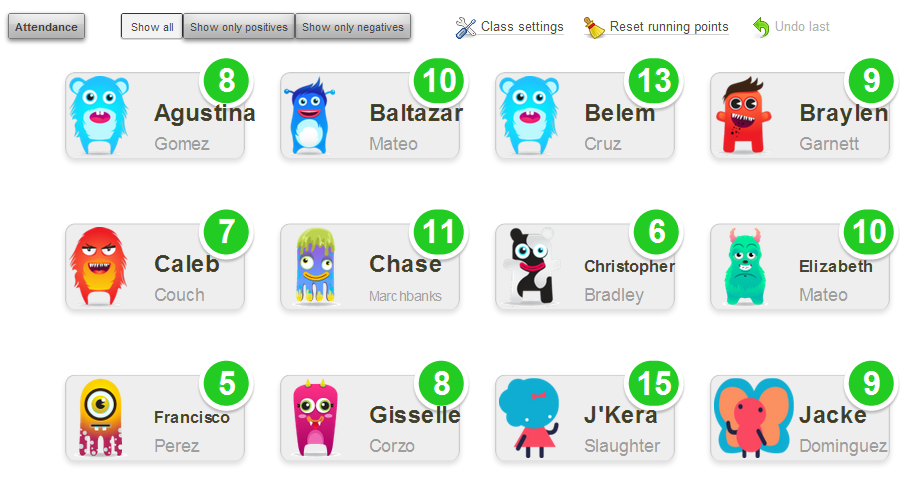
My first favorite website of choice is Class Dojo! It is used for classroom management and behavior! You can view my post about it on Technology Tailgate HERE!

I also use Youtube and United Streaming ALL the time to show videos in the classroom or show read alouds with someone other than me reading!!

I love this website for Interactive Read Alouds!


Our faculty is receiving ipads next week and I was told about an app to help administer running records for Fountas and Pinnell! I am so excited to test it out! You can download it free on your iphone! Not sure if they have it available for other smartphones!


I discovered Prezi.com last year and it is like the new and fun Powerpoint! It twists and turns and does cool stuff! You can check it out by clicking my Meet the Teacher Prezi below!


And finally, the technology that I can't live without and use ALL the time, every day, are my Activ Expressions! They are interactive devices that connect with your Promethean or SMART board. You can put questions up on the board and students send their answers with these devices! You can informally assess, give quizzes and tests, practice math facts, give self paced tests and quizzes, and so much more! Our school is fortunate enough to have sets for most all classrooms! 

TIPS: Set them up with your students names so you can see exactly who hasn't answered and who answered what! I also keep them in a bin at each group so I don't have to distribute them every time we use them -- which is OFTEN! You can see the little bin in the desk preview above!

I start school with the kiddies tomorrow so I am kinda nervous!! I will probably be having those new class nightmares tonight! Wish me luck!

Go link up your Teacher Tip with Blog Hoppin' HERE!